Wi-Fi 4 and Wi-Fi 6 Features
The open-source openwifi release implements 802.11a/g plus a single-stream, 20 MHz subset of 802.11n (Wi-Fi 4). The release does not implement Wi-Fi 5 (802.11ac). Wi-Fi 6 (802.11ax) exists only as a commercial offering.
The Architecture page covers the same feature set from the design side, with the throughput derivation and diagrams. This page covers how you use it. If Wi-Fi itself is new to you, start with the primer below. If you know 802.11, skip straight to the timeline.
A short 802.11 primer
This section is for people who know RF and digital modulation but haven't worked with Wi-Fi as a standard. It's the minimum background the rest of the page assumes. Individual terms are in the Glossary.
The standard and its names. Wi-Fi is IEEE 802.11 plus a series of amendments named with letters (a, b, g, n, ac, ax). Each amendment layers new capabilities on the existing ones, and devices stay backward compatible with older peers on the same channel. The Wi-Fi Alliance introduced the generation numbers Wi-Fi 4, 5, and 6 as marketing labels in 2018. 802.11n is Wi-Fi 4, 802.11ac is Wi-Fi 5, and 802.11ax is Wi-Fi 6. Nothing was ever officially called Wi-Fi 1 through 3. Channels live in the 2.4 GHz and 5 GHz bands (Wi-Fi 6E later added 6 GHz).
The PHY, in RF terms. A standard channel is 20 MHz wide and carries OFDM with a 64-point FFT, so subcarriers sit 312.5 kHz apart. Legacy 802.11a/g fills 48 subcarriers with data and 4 with pilots. Each OFDM symbol lasts 4 µs, made of 3.2 µs of useful symbol and a 0.8 µs guard interval. The guard interval is a cyclic prefix that absorbs multipath delay spread.4 Subcarriers carry BPSK up to 64-QAM, protected by a rate 1/2 convolutional code that puncturing thins out to rates 2/3, 3/4, and 5/6. The fraction is the share of transmitted bits that carry information, so 5/6 has the least redundancy. The receiver decodes the code with a Viterbi decoder, which in openwifi is a Xilinx IP core. Each modulation-plus-code-rate combination has an index called the MCS. The transmitter picks the rate again for every frame, based on which frames get through. On openwifi, Linux's minstrel_ht rate-control algorithm does this, and you can pin the rate manually when you need repeatability.
One shared channel, half duplex, no scheduler. Every station transmits and receives on the same frequency and never both at once. Access is contention based (CSMA/CA). A station listens until the channel is idle, waits a random backoff, and transmits. It then waits for the receiver's acknowledgement. The ACK must start within a fixed short gap (SIFS, 10 or 16 µs depending on band). A software MAC cannot meet a deadline this short, so openwifi runs this logic in the FPGA. This means that every frame pays a fixed cost of preamble, backoff, and ACK, and real throughput lands well below the PHY rate. Features that spread that cost over more data, such as aggregation, often gain more than a faster PHY rate does.
From OFDM to OFDMA. Every generation up to and including Wi-Fi 5 uses OFDM as a single-user scheme. The station that wins contention gets every subcarrier in the channel for the whole frame, so stations share the medium in time only. OFDMA, introduced by Wi-Fi 6, shares it in frequency as well. The subcarriers of one channel are grouped into resource units (RUs), and the access point assigns RUs to different stations within the same transmission. In a 20 MHz channel, an RU spans 26, 52, 106, or 242 tones. This allows anything from one user on the full channel to nine users in parallel, each on a slice about 2 MHz wide.4 Downlink OFDMA is one long frame carrying data for several receivers at once. Uplink OFDMA is harder. The AP invites specific stations with a trigger frame, and their transmissions must arrive at the AP aligned. Every station therefore has to pre-correct its timing and carrier frequency tightly enough to stay orthogonal to its neighbors in the same FFT. OFDMA targets efficiency more than peak speed. A short packet no longer pays a full contention cycle for a 20 MHz channel it barely fills. The AP can then schedule a crowded channel instead of leaving it purely to contention.
Features must be negotiated. Stations advertise what they support in capability fields inside management frames (beacons, probe responses, association frames). A feature is only used on a link when both ends advertise it. Some features exist in openwifi's FPGA but stay unused until you tell the driver to advertise them. Short guard interval is the main example.
Where openwifi sits in the Wi-Fi timeline
| Generation | Standard | Status in openwifi (open source) |
|---|---|---|
| pre-Wi-Fi 4 | 802.11a and 802.11g | Supported (legacy OFDM, 6–54 Mbps)1 |
| pre-Wi-Fi 4 | 802.11b | Not supported. openwifi is OFDM-only, see About 802.11b |
| Wi-Fi 4 | 802.11n | Supported: single spatial stream, 20 MHz, MCS 0–7 (this page)1 |
| Wi-Fi 5 | 802.11ac | Not implemented (see below) |
| Wi-Fi 6 | 802.11ax | Commercial only, via openwifi.tech1 |
Narrower channels (2 MHz and 10 MHz)
The upstream README lists 2 MHz for 802.11ah-style sub-GHz work and 10 MHz for 802.11p vehicular work. These are adaptation targets for the 20 MHz design, not complete implementations of either standard. See Adapting the design for 10 MHz or 2 MHz channels for the FPGA, RF, driver, and timing changes. Frequency tuning changes the center frequency only.
Why there's no Wi-Fi 5
Wi-Fi 5 gets its speed from 80 and 160 MHz channels, up to eight spatial streams, and MU-MIMO, all in the 5 GHz band only. A 20 MHz single-stream design can use none of that. The only 11ac feature that would apply is 256-QAM, which gives roughly 87 Mbps at 20 MHz single-stream versus 72 Mbps for 11n.4
Wi-Fi 6 is different. It reworks the OFDM numerology and adds OFDMA, which subdivides a single 20 MHz channel between users. Those features matter even at 20 MHz with a single stream. Of the two generations, only Wi-Fi 6 offers much that this hardware can use. Going from 11n straight to 11ax therefore skips almost nothing openwifi could have used.
Wi-Fi 4 (802.11n) in the open-source release
802.11n's formal name for its feature set is HT, high throughput, and that label appears everywhere in practice. Driver logs mark 802.11n frames ht1 and legacy 11a/g frames ht0. Tools take -m n or "HT" flags, and capability fields are called "HT capabilities." The amendment added five PHY improvements and frame aggregation at the MAC:
| 802.11n feature | What it does | In openwifi? | How you control it |
|---|---|---|---|
| 52 data subcarriers (up from 48) | ~8% more throughput per symbol | ✅ yes | Automatic for every HT frame |
| 5/6 convolutional coding | Higher top code rate (was 3/4) | ✅ yes | Automatic at MCS 7 |
| 400 ns short guard interval | ~11% shorter symbols | ✅ yes, not advertised by default | test_mode bit 1, rate override +16, or inject_80211 -i 1 (details below) |
| A-MPDU frame aggregation | Amortizes contention and preamble overhead over many frames | ⚠️ experimental | ./wgd.sh 1 (details below) |
| A-MSDU frame aggregation | The other aggregation flavor | ❌ no | – |
| MIMO (up to 4 streams) | Multiplies throughput by the stream count | ❌ no | – |
| 40 MHz bandwidth | Doubles the channel | ❌ no | – |
With everything supported switched on, the theoretical PHY ceiling is 72.2 Mbps (MCS 7 with short GI). The step-by-step derivation is on the Architecture page. Measured throughput reaches 40 to 50 Mbps TCP and about 50 Mbps UDP with aggregation on.1
The HT rate table
openwifi supports all eight single-stream MCS indices at 20 MHz:4
| MCS | Modulation | Code rate | Rate (800 ns GI) | Rate (400 ns short GI) |
|---|---|---|---|---|
| 0 | BPSK | 1/2 | 6.5 Mbps | 7.2 Mbps |
| 1 | QPSK | 1/2 | 13 Mbps | 14.4 Mbps |
| 2 | QPSK | 3/4 | 19.5 Mbps | 21.7 Mbps |
| 3 | 16-QAM | 1/2 | 26 Mbps | 28.9 Mbps |
| 4 | 16-QAM | 3/4 | 39 Mbps | 43.3 Mbps |
| 5 | 64-QAM | 2/3 | 52 Mbps | 57.8 Mbps |
| 6 | 64-QAM | 3/4 | 58.5 Mbps | 65 Mbps |
| 7 | 64-QAM | 5/6 | 65 Mbps | 72.2 Mbps |
Each step up the table packs more bits per subcarrier or trims coding redundancy, so it needs more SNR. You can see the cost directly in openwifi's published sensitivity figures: −92 dBm at MCS 0 versus −73 dBm at MCS 7 (see Specifications).
By default Linux's minstrel_ht rate control walks this table automatically based on link quality. You only need to intervene for experiments (see forcing an MCS).
What a frame looks like on the air
Everything above (MCS, guard interval, aggregation) is a property of one PPDU, the complete PHY frame that openwifi's FPGA puts on the air. A PPDU is a PHY preamble followed by a Data field. Before sending it, the transmitter wins the channel through DIFS-plus-backoff contention. After a fixed SIFS gap, the receiver answers. The figure below walks down through those three levels.
Every generation keeps the same legacy preamble (L-STF, L-LTF, L-SIG, about 20 µs) so that any nearby 802.11a/g device can still detect the frame and defer. 802.11n adds about 8 µs of HT training on top, and 802.11ax about 16 µs of HE training. The preamble, the SIFS, and the acknowledgement are paid once per PPDU, however much data it carries. Packing many MPDUs into one Data field as an A-MPDU (bottom row) therefore saves a lot of airtime.
Turning on A-MPDU aggregation
Aggregation gives the largest practical throughput gain. At tens of Mbps the fixed per-frame cost (preamble, SIFS, ACK, backoff) starts to dominate, and A-MPDU packs many MPDUs into one transmission so that cost is paid once. Acknowledgement is amortized the same way. The receiver answers the whole aggregate with a single block ACK that flags any subframes needing retransmission, instead of sending one ACK per frame.4 openwifi's published iperf numbers were measured with aggregation on.1
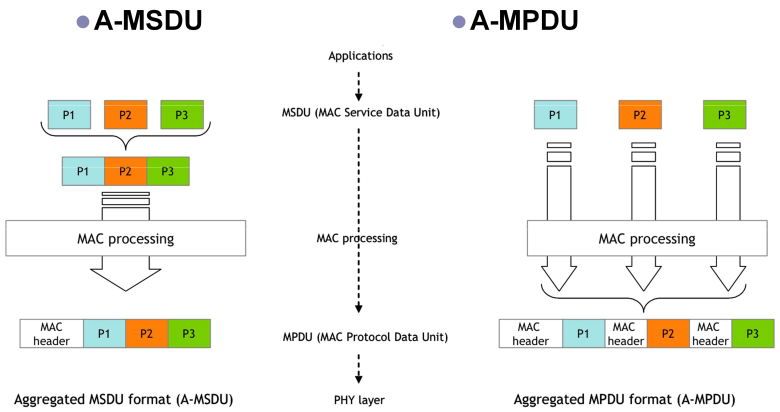
It's off by default. Enable it when loading the driver:
cd openwifi
./wgd.sh 1        # test_mode=1, bit 0 = A-MPDU aggregation
The 1 becomes the test_mode module parameter of sdr.ko. With bit 0 set, the driver advertises A-MPDU support in its HT capabilities, with aggregates up to 8 kB and a 2 µs minimum MPDU spacing. It also handles mac80211's aggregation callbacks.3 Both ends of the link negotiate the rest through the normal 802.11 block-ack setup.
Experimental
Aggregation is documented as experimental.2 Try it first when you want more throughput, and turn it off first when you are investigating instability.
Short guard interval
802.11n's short GI halves the guard interval from 800 to 400 ns, trading multipath margin for about 11% more throughput.4 That trade is usually safe on short, clean links (a lab bench, a cabled setup) and riskier in reflective environments.
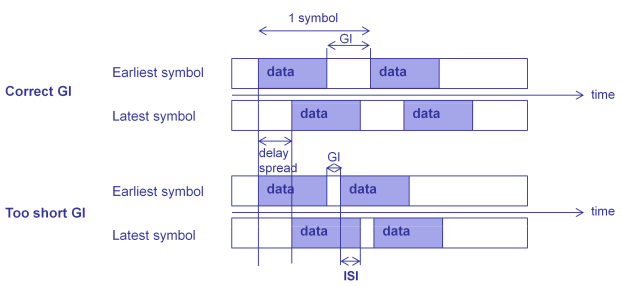
openwifi's PHY handles 400 ns short-GI frames in both directions. Short GI is what lifts MCS 7 from 65 to 72.2 Mbps. However, the driver only advertises short-GI support to peers when test_mode bit 1 is set. The code comment says short GI "seems to bring unnecessary stability issue." By default, a negotiated link therefore runs with the normal 800 ns GI and tops out at 65 Mbps.3
./wgd.sh 2        # advertise short GI only
./wgd.sh 3        # bits 0+1: aggregation AND short GI
The written documentation only describes bit 0. Bit 1 comes straight from the driver source (test_mode&2 in sdr.c), so treat it as a code-level switch that may move.3
You can also use short GI without any capability negotiation:
- Pin the TX rate with short GI: add 16 to the HT rate override value (next section).
- Inject short-GI frames in monitor mode with
inject_80211 -i 1(see packet injection).
On receive, openwifi decodes whatever GI the frame uses and reports it in the driver's RX log line (the sgi field, below).
Forcing an MCS by hand
For controlled experiments you usually want a fixed rate instead of minstrel_ht:
./sdrctl dev sdr0 set reg drv_tx 1 11      # pin HT TX to MCS 7 (65 Mbps)
./sdrctl dev sdr0 set reg drv_tx 1 27      # same but short GI (11 + 16 = 72.2 Mbps)
./sdrctl dev sdr0 set reg drv_tx 1 0       # back to auto
Values 4 through 11 select MCS 0 through 7. Register 0 does the same for legacy (non-HT) rates. The full table is in the sdrctl register reference.
In monitor mode, inject_80211 -m n -r <0..7> selects the MCS per injected frame instead.
Checking what is on the air
The quickest way to see whether HT, aggregation, and short GI are in use is the driver's RX print in dmesg. Enable it with the dmesg print control (see Troubleshooting → driver dmesg logging). A received frame then logs a line like this:
sdr,sdr openwifi_rx: 270B ht1aggr1/0 sgi1 650M FC0088 ...
ht1means an 802.11n (HT) frame,ht0a legacy 11a/g frameaggr1/0means the frame came from an A-MPDU (second digit marks the last subframe)sgi1means short guard interval650Mis the rate, here 65 Mbps = MCS 72
A capture with tcpdump on a monitor interface shows the same information in the radiotap header. This is per-frame metadata that the driver attaches to captures, such as the rate or MCS, the guard interval, and the signal strength. It is easier to use for offline analysis.
Limitations to plan around
- One spatial stream, 20 MHz, always. The 72.2 Mbps ceiling is a hard PHY limit of the open-source design. The two antennas on a board are separate TX and RX paths for isolation, not MIMO.
- Throughput in practice is about 50 Mbps, well below the 72.2 Mbps PHY rate. Preambles, ACKs, and contention take their share even with aggregation.1
- Short GI is off by default at the capability level, so a default link peaks at 65 Mbps PHY rate.
- A-MSDU is absent and A-MPDU is experimental, so a commercial peer that relies on aggressive aggregation defaults reaches a higher rate than an openwifi link.
- No 802.11b compatibility. In the 2.4 GHz band, legacy clients and management-frame fallbacks cause problems. See About 802.11b.
Wi-Fi 6 (802.11ax)
Status
Wi-Fi 6 is not in the open-source release. The README lists "802.11ax and more advanced features" under the commercial offering at openwifi.tech, which provides subscriptions on top of the AGPLv3 baseline (academic discounts are available).1
The open driver's register map already reserves slots for VHT (11ac) and HE (11ax) rate overrides, both marked not implemented.2 The open code is the platform that Wi-Fi 6 work builds on. It does not include the Wi-Fi 6 PHY.
What Wi-Fi 6 would add on this hardware
The feature-set names describe the intent. 802.11n's feature set is called HT, high throughput, and it made a single link faster. The 802.11ax feature set, HE (high efficiency), aims instead at busy channels with many stations, small packets, and latency-sensitive traffic. Unlike Wi-Fi 5, its features don't depend on wide channels or many antennas, so they remain meaningful on this hardware. At 20 MHz with a single stream, the two generations compare like this:4
| Wi-Fi 4 (802.11n) | Wi-Fi 6 (802.11ax) | |
|---|---|---|
| Subcarrier spacing | 312.5 kHz | 78.125 kHz |
| OFDM symbol | 3.2 µs + 0.4 or 0.8 µs GI | 12.8 µs + 0.8, 1.6, or 3.2 µs GI |
| Data subcarriers (20 MHz) | 52 | 234 |
| Top modulation | 64-QAM (MCS 7) | 1024-QAM (MCS 11) |
| FEC | Punctured convolutional (BCC) | LDPC at the higher rates |
| Max PHY rate | 72.2 Mbps (short GI) | 143.4 Mbps (0.8 µs GI) |
| Channel sharing | Time only (CSMA/CA) | Time and frequency (OFDMA resource units) |
| Multi-user | None at one stream | Downlink and uplink OFDMA (plus MU-MIMO with more antennas) |
| Power saving | Legacy power save | Target Wake Time (TWT): sleep on a negotiated schedule |
| Overlapping networks | Defer to any detected frame | BSS coloring: ignore sufficiently weak frames from other networks |
What the rows mean in practice:
- The denser numerology is the enabler. Subcarriers sit 4x closer and symbols run 4x longer within the same 20 MHz. This allows the channel to be divided into RUs, since a 26-tone RU still has enough subcarriers to be useful. The longer guard intervals also tolerate outdoor delay spreads that would break an 800 ns GI.
- 1024-QAM and LDPC roughly double the single-stream ceiling, but only at SNRs a clean short link can deliver. The efficiency features matter in more situations than the speed ones.
- OFDMA changes the access model as well as the rate (see the primer for how RUs and trigger frames work). Scheduled uplink access allows latency control that pure CSMA/CA cannot give. It is also the feature that openwifi's Wi-Fi 6 research focuses on.
- TWT and BSS coloring target dense deployments: battery devices that wake on a schedule instead of contending, and neighboring networks that overlap without freezing each other.
Wi-Fi 6E's new spectrum (5.925 to 7.125 GHz) is mostly out of reach, because the AD9361 front end tops out at 6 GHz.
openwifi in Wi-Fi 6 research
Although the open release stops at Wi-Fi 4, openwifi is the base of published Wi-Fi 6 work. This includes experimental OFDMA and cross-technology interference studies, and an ACM WiNTECH 2025 best paper on coordinated OFDMA. See selected publications and the full publications list.
If you need Wi-Fi 6 today
The open release can approximate many Wi-Fi 6 scheduling experiments through programmable MAC controls. Every MAC timing parameter, CCA threshold, and queue is configurable (see sdrctl & Runtime Control and Research Features). Check those controls before deciding whether you need the 11ax PHY. For the commercial version and subscription tiers, contact the team through openwifi.tech.
Sources
-
openwifi
README.md: the feature list (802.11a/g/n, 20 MHz, aggregation via./wgd.sh 1, measured performance) and the statement about 802.11ax at openwifi.tech. ↩↩↩↩↩↩↩ -
openwifi
doc/README.md: thetest_modedefinition (bit 0 = A-MPDU) and thedrv_txrate-override registers, including the unimplemented VHT and HE slots and the+16short-GI encoding. It also gives the RX print format (ht,aggr, andsgifields). ↩↩↩ -
openwifi
driver/sdr.c: HT capability setup (IEEE80211_HT_CAP_SGI_20gated ontest_mode&2with the stability comment, A-MPDU parameters gated ontest_mode&1, MCS 0 to 7 inmcs.rx_mask) andopenwifi_ampdu_action(). ↩↩↩ -
IEEE 802.11: values that follow from the standard (the HT MCS table, 11ac/11ax feature sets and rates), not from openwifi-specific measurements. ↩↩↩↩↩↩↩